
Short answer
There's no single winner. Google Calendar or Apple's Family calendar is enough for many families and costs nothing extra. Cozi is the pick if lists and meals are your mess. TimeTree is the simplest dedicated shared calendar. FamilyWall bundles the most. If the hard part is who drives to which class, Kidbud is built for that.
What makes a family calendar app actually good?
A good family calendar app is one both parents open without being nagged. That sounds obvious, but it rules out a lot. It has to run on both of your phones, show one child's week at a glance, and make it clear who is responsible for each event. Everything else, from meal plans to photo screensavers, is a bonus you may or may not use.
You're far from the only one shopping. Keyword trackers put "family calendar" at about 18,100 searches a month worldwide, and searches for "family shared calendar" grew 180% over two years. What we haven't found is good data on which of these apps families still open six months later, which is the number that would actually settle this.
Picture a very ordinary failure. It's 4:40 on a Wednesday, soccer ends at 5:15, and both parents assume the other one is going. The event was on the calendar. The driver wasn't. (That gap is the whole reason Kidbud exists, so yes, we're biased about how much it matters.)
How do the top family calendar apps compare?
The big split is between all-in-one organizers (Cozi, FamilyWall), pure shared calendars (TimeTree, Google, Apple) and wall screens (Skylight). Only one app on this list assigns a driver to each drop-off and pickup and sends that person a traffic-aware reminder to leave. Prices checked October 2026; always confirm on the official page before you pay.
| App | Price | Platforms | Best for | Driver per drop-off and pickup, traffic-aware leave reminders |
|---|---|---|---|---|
| Kidbud | $59.99/yr or $12.99/mo, one subscription for the whole family | iPhone, Android | Families whose week is classes and driving | Yes |
| Cozi | Core app at no cost; Cozi Gold $39 (see Cozi's site for billing period) | iPhone, Android, mobile browser | Shopping lists, to-dos and meal planning next to the calendar | No |
| TimeTree | Core app at no cost; Premium $4.49/mo or $44.99/yr | iPhone, Android | A simple shared calendar, plus separate ones for school or hobby groups | No |
| FamilyWall | Premium $4.99/mo or $44.99 billed annually | iPhone, Android, desktop | The most features in one place, including location and messaging | No |
| Google Calendar | Included with a Google account | Computer, Android, iPhone and iPad | Mixed iPhone and Android families who already use Gmail | No |
| Apple Calendar with Family Sharing | Included on Apple devices | Apple devices | All-iPhone families of up to six people | No |
| Skylight Calendar 2 (hardware) | $299.99, plus Calendar Plus at $79/yr | Wall or counter screen with a companion app | A shared screen in the kitchen, especially with young kids | No |
And Kidbud's limits, since it's our row: no lists, chores or meal planning. No wall display. It doesn't sync with Google or Apple calendars, and there's no version without a subscription.
What does each family calendar app do best?
Cozi is strongest on lists and meals, TimeTree on plain shared calendars, FamilyWall on sheer quantity of features, and Google or Apple on costing nothing extra. What follows comes from each app's own website, not from long-term testing in our house. Where a competitor beats us, we say so.
Cozi
Cozi's core app covers a shared calendar, shopping lists, family to-do lists and a recipe box with a meal planner. Gold adds an ad-free experience, month view on mobile, calendar search, up to three reminders per event, change notifications, a birthday tracker and shopping mode. If your fights are about groceries, Cozi is hard to beat. We compare it in detail in Cozi vs TimeTree vs FamilyWall.
TimeTree
TimeTree does one thing: shared calendars, with the option to keep several (family, school group, a hobby) and view them together or one at a time. Premium removes ads and adds file attachments, a vertical calendar view and pinned events. TimeTree's own 2022 announcement said the existing features would stay usable without paying.
FamilyWall
FamilyWall is the kitchen sink: calendar with Google and Outlook.com sync, lists, a meal planner, a family messenger, location sharing with place alerts, and a budget tracker on Premium. Great if you want one app for everything. It's a lot of app if you only wanted a calendar (not a knock, just a warning).
Google Calendar and Apple Calendar
Create a family group on Google and a calendar called Family appears automatically, and anyone in the family can change its events. Apple does the same thing: set up Family Sharing (you plus up to five people) and a Family calendar shows up on everyone's devices. We'd start here, and only pay for something once you hit a specific wall. Our guide to the Google family calendar covers the setup.
Which family calendar app works on both iPhone and Android?
Google Calendar, Cozi, TimeTree, FamilyWall and Kidbud all run on both iPhone and Android, so a mixed couple can share one calendar with any of them. Apple's Family calendar is the odd one out: it's built for Apple devices, so it only really works if everyone in the family carries an iPhone or iPad.
This matters more than any feature. If one parent can't open the calendar on their own phone, the calendar slowly stops being true.
Which one should you pick?
Pick by your biggest headache. A long feature list mostly means more screens to ignore. We've matched six common family situations to the app we'd try first. These are judgment calls, and two of them don't involve paying anyone. If your free calendar already works and you only need lists, skip the new app entirely.
| Your situation | Start with | Why |
|---|---|---|
| Everyone has an iPhone and the calendar mostly works | Apple's Family calendar | It's already there. Don't add an app you'll abandon. |
| Mixed iPhone and Android, light schedule | Google Calendar family group | No cost, both phones, works with what you have. |
| Groceries, chores and dinners cause the most friction | Cozi or FamilyWall | Lists and meal planning live next to the calendar. |
| You want a plain shared calendar with nothing extra | TimeTree | Simple, cross-platform, separate calendars for groups. |
| Young kids who can't read a phone | Skylight | A screen on the wall they can see. Pricier up front. |
| Two or three kids in classes and the driving keeps slipping | Kidbud | Every drop-off and pickup has one named parent, and that parent gets the leave alert. |
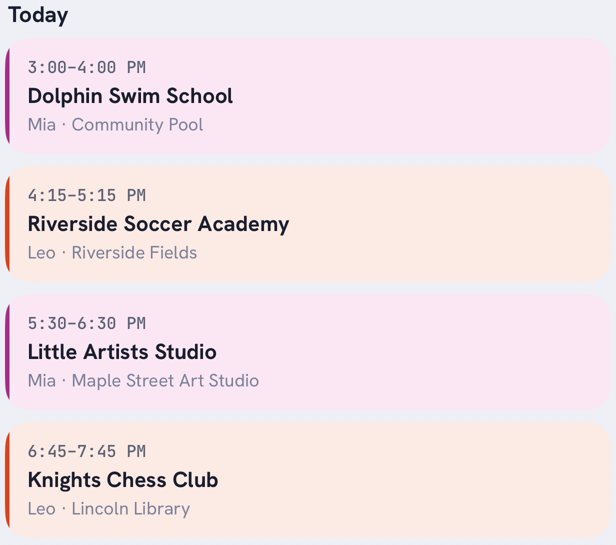
Say your son has swim at 3:00 and your daughter has art at 5:30 across town. In Kidbud you'd put the swim drop-off on one parent and the art pickup on the other, and each gets their own reminder (there's more on splitting this in how to split drop-offs and pickups).
Is a wall calendar like Skylight worth it?
A wall calendar is worth it if your kids are young enough that a big screen in the kitchen helps them understand the day, or if one parent rarely checks their phone. Skylight Calendar 2 costs $299.99, and Calendar Plus is $79 a year for extras like meal planning and Magic Import. Hearth Display is $699 and requires a membership.
The upside is real: Skylight syncs with Google, Outlook, Apple, Cozi and Yahoo calendars, and the free version already includes tasks and custom lists. The downside is that a screen on the wall can't tell you it's time to leave when you're at the office. We.d skip the screen unless your kids are under about six (the age when a chore chart still beats a phone). Our Skylight calendar alternatives guide goes deeper.
Where Kidbud fits, and where it doesn't
Kidbud is a family calendar for kids' classes and the driving around them. It's a narrow tool on purpose. It doesn't replace a grocery app or a wall screen, and it won't pull in your Google or Apple calendar. What it does is put one parent's name on every drop-off and pickup, then tell that parent when to leave.
In practice: a shared calendar with day, week and month views that you can filter by child. Each drop-off and pickup goes to one parent, who gets a traffic-aware Leave Now reminder, timed separately for drop-offs and pickups (just as you leave, a 20-minute heads-up, or your own times). You can invite a spouse, a caregiver or grandparents, and one subscription, $59.99 a year or $12.99 a month, covers all of them.
There are two smaller pieces: birthday party invites shared by link, with RSVPs counted as going, maybe and can't, and Discover, which suggests local classes matched to each child's interests and adds one to the calendar.
No carpools between families. If that's what you need, it isn't us yet.
Know who's driving before 4:40 on a Wednesday
Kidbud puts one parent's name on every drop-off and pickup and tells that parent when to leave.


Going deeper on one option? We've put Hearth and Skylight side by side, walked through sharing a calendar with your spouse on any mix of phones, and covered setting up a family command center if you want paper, a screen and an app working together.
Frequently asked questions
What is the best family calendar app for iPhone and Android?
Google Calendar is the safest no-cost pick for a mixed iPhone and Android family. Cozi, TimeTree and FamilyWall also run on both. If your real problem is who drives to which class, pick an app that assigns each drop-off and pickup to one parent.
What is the best shared family calendar?
For most families it's the one already on everyone's phone: Google's Family calendar or Apple's Family calendar. Switch to a dedicated app only when you need something those don't do, like Cozi's lists or a named driver per drop-off.
Is a family organizer app different from a family schedule app?
Loosely, yes. Organizer apps such as Cozi and FamilyWall bundle a calendar with lists, meals and more. Schedule apps focus on the calendar itself. Pick an organizer if lists are your pain, and a schedule app if timing and driving are.
Should I trust best family calendar app threads on Reddit?
They're good for hearing what annoys real parents day to day, but each answer reflects one family's phones and routine. Check current prices on each app's official page, since threads age fast and plans change.
Sources
- Cozi, Cozi Gold features and price
- TimeTree, home page and Premium pricing
- TimeTree, Premium announcement, April 2022
- FamilyWall, Premium pricing
- FamilyWall, features and platforms
- Google, family calendar help
- Google Calendar help, supported devices
- Apple, what is Family Sharing
- Apple iPhone User Guide, share a family calendar
- Skylight, Calendar 2 and Calendar Plus pricing
- Hearth Display, price and membership
- RankHero, "family calendar" search volume
- Exploding Topics, "family shared calendar" growth