
Short answer
Only if your family runs on the kitchen. Skylight ($299.99, plus $79 a year for Calendar Plus) is great for an at-a-glance view, chore charts and kids too young for phones. If your real headache is who's driving and when to leave, a shared Google or Apple calendar costs nothing extra, and a phone app reaches the driver wherever they are.
What does a Skylight Calendar actually do?
Skylight Calendar is a touchscreen for the wall or counter that shows the family schedule. Its product page says it syncs with Google, Outlook, Apple, Cozi and Yahoo, and the base version includes a chore checklist for kids. The optional Calendar Plus plan adds meal planning, a photo screensaver, Magic Import, rewards and Disney Mode.
That's genuinely useful. Everyone walking past the fridge sees the week, and a four-year-old can tick off "brush teeth" without touching a phone.
But it's 4:40 on a Wednesday, swim ends at 5:00, and you're in a meeting across town. The screen in your kitchen is showing the right event to an empty room. (That gap is the reason we built Kidbud's Leave Now reminders, which go to the driver's phone instead.)
How much does Skylight cost over three years compared with the alternatives?
Over three years, Skylight with Calendar Plus comes to $536.99 and Hearth with its required membership $958.20. Kidbud is $179.97 for the same stretch, with no hardware. A shared Google or Apple calendar adds nothing to what you already pay for your phones. These are list prices, checked October 2026, and any of them could move by the time you read this.
| Option | Upfront | Yearly | Three-year total |
|---|---|---|---|
| Skylight Calendar 2 (15") | $299.99 | $79 Calendar Plus (optional) | $536.99 with Plus, $299.99 without |
| Hearth Display | $699 | $86.40 membership (required) | $958.20 |
| Kidbud (phone app, no screen) | $0 | $59.99, or $12.99 a month | $179.97 |
| Shared Google or Apple calendar | $0 | $0 | $0 |
Hearth says its membership is required to set the display up, at $9 a month or $86.40 a year. Skylight's Plus plan is optional. Check Skylight's product page and Hearth's product page before you buy. (We didn't price the smaller or larger Skylight frames, only the 15-inch.)
Who is a wall calendar display best for?
A wall display suits families with young kids who plan from one room and want chores and meals on a screen in the kitchen. It's weaker for two working parents, because the screen can't follow you to the office or the car. Our opinion, for what it's worth: skip the screen unless your kids are under about six or you really want the chore chart.
Where it shines:
- Preschoolers and early elementary kids who can't read a phone calendar yet.
- Chore charts and rewards (Skylight and Hearth both do these well).
- A parent who's home most afternoons and plans from the kitchen.
- Households that like a visible weekly meal plan.
Where it struggles is the 4:10 problem, when nobody's sure who's getting the kids. A screen can show the swim class beautifully and still not know which of you is in the car. Our guide to splitting drop-offs and pickups deals with it directly.
How do you get a family calendar without buying a screen?
Use a shared calendar you already have. Google creates a calendar called "Family" automatically when you set up a family group, and anyone in the family can change its events. Apple's iCloud Calendar lets you share a calendar privately and allow people to create, edit and delete events. Both work on phones you own today, for $0.
- Pick one platform. If one of you is on iPhone and the other on Android, Google is the easier choice.
- Make one calendar just for the kids' classes, kept apart from work calendars.
- Name events the way you'd say them out loud, like "Maya soccer, cleats in the trunk", so they read well on a lock screen.
- Look at the coming week together on Sunday night. Five minutes is plenty.
If you still want something on the wall, an old tablet on a cheap stand, open to that shared calendar, gets you surprisingly close (assuming the tablet's already in a drawer). Our Google family calendar setup guide has the steps.
What should a Skylight Calendar alternative app do?
It should put every child's classes in one shared calendar, show who's doing each drop-off and pickup, and warn the right parent when it's time to leave. Plain shared calendars handle the first part well. They don't assign a driver, though, and their alerts fire at a fixed time no matter what traffic is doing on the way to the pool.
| What you need | Skylight or Hearth | Shared Google or Apple calendar | Kidbud |
|---|---|---|---|
| Kitchen at-a-glance view | Yes | No | No, there's no wall display |
| Chores, lists, meal planning | Yes (meal planning needs a paid plan) | No | No |
| Pulls in Google or Apple calendars | Yes | Yes | No, it doesn't sync or import them |
| A named driver on each drop-off and pickup | No | No | Yes |
| Traffic-aware leave alert on the driver's phone | No | No | Yes |
Say your son's chess club ends at 6:45 on Thursdays. In Kidbud you'd assign that pickup to your partner, and the leave alert goes to them, not you.
How Kidbud fits in
We built Kidbud as a phone app for iPhone and Android, around drop-offs and pickups, so it loses to Skylight on anything kitchen-based. It isn't a screen, and it has no chores, lists or meal planning. Every class gets a drop-off and a pickup, each assigned to one parent, and that parent gets a traffic-aware Leave Now reminder. Timing is set separately for drop-offs and pickups.
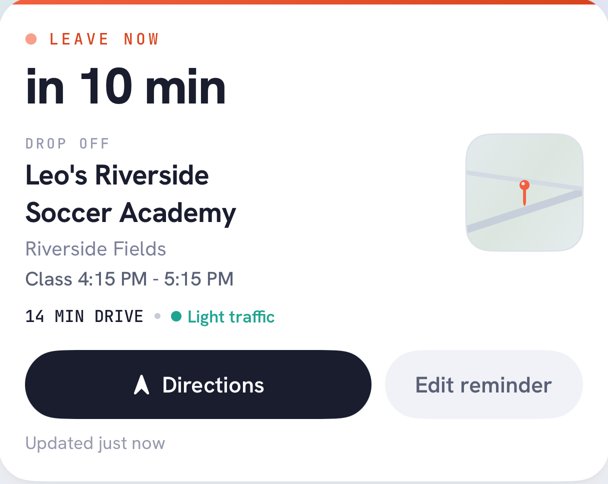
You can invite your spouse, a caregiver or the grandparents, and filter the day, week or month view by child. It's $59.99 a year or $12.99 a month, and one subscription covers everyone you invite.
Plenty of families will want both, honestly. Two different jobs. The screen keeps the chore chart in the kitchen, and the phone app follows whoever's driving.
Your wall screen can't text the driver
Kidbud puts a name on every drop-off and pickup and tells that parent when to leave.


Frequently asked questions
Is Skylight Calendar worth it?
It's worth it if your family plans in the kitchen, your kids are young enough for a chore chart, and you want one glanceable screen. It's less worth it if most of your scheduling happens in the car or at work, because a wall screen can't tell a parent when to leave.
Can you use Skylight Calendar without a subscription?
Yes. Skylight sells the frame for $299.99, and its product page lists calendar syncing and a chore checklist without Calendar Plus. The $79 a year Plus plan adds meal planning, a photo screensaver, Magic Import, rewards and Disney Mode.
Hearth vs Skylight: which costs more?
Hearth costs more. The Hearth Display lists at $699 and its membership is required to set it up, at $86.40 a year on the annual plan. Over three years that's $958.20, against $536.99 for Skylight with Calendar Plus.
Is there a Skylight Calendar alternative app?
Yes. A shared Google or Apple calendar costs nothing extra and works on every phone. Kidbud is a family calendar app for iPhone and Android that assigns each drop-off and pickup to a parent and sends that driver a Leave Now reminder.