
Short answer
A family command center is one agreed place where the week lives: the calendar, who's driving each drop-off and pickup, forms to sign, the lunch menu and the chore chart. Put it on a kitchen wall if someone's home most afternoons, on a screen if you want it to update itself, or on your phones if the schedule mostly happens away from the house.
What is a family command center?
A family command center is a single spot, usually near the door you leave by, where everything the household needs this week is visible at once. It holds the calendar, the paper that needs signing, the chore chart and a few other things. The point is that nobody has to ask "where's the permission slip" or "who's getting Maya" because the answer is already posted.
It's 7:52 on a Monday. The field trip form is somewhere in a backpack, nobody remembers if it's pizza day, and both parents assume the other one is doing soccer pickup at 5:15. (Nobody finds out about that last one until 5:20.) A wall with three things written on it would have caught all of it.
Somebody in most homes is already the command center, in their head. In a 2022 Pew Research Center survey, 78% of mothers living with a spouse or partner said they do more than their partner to manage the kids' schedules and activities. Putting it on a wall, or in an app, is partly a way of handing some of that load back. Our mental load checklist goes further on that. The driving slice of it is what we built Kidbud for, so we're not neutral on that part.
One honest caveat before the how-to. We couldn't find any research showing that command centers cut missed pickups or forgotten forms. The case for them is common sense and a lot of parent blogs, which is fine, but it's not evidence.
What should you put in a family command center?
Put in only what your family looks at every week: a calendar with every child's classes, a named driver for each drop-off and pickup, an inbox for forms and permission slips, this week's school lunch menu and a chore chart. Add a meal plan if you cook from one. Leave out anything you check once a month, because clutter is how command centers quietly stop working.
| What belongs in it | Why | Paper wall | Digital screen | Phone app |
|---|---|---|---|---|
| Family calendar | Every class, game and appointment in one place | Good, if someone updates it | Very good, syncs itself | Very good, and it's with you |
| Who's driving | A name on every drop-off and pickup | Write it next to each event | Possible in event notes | Best when the app assigns a driver |
| Forms and permission slips | Paper that needs a signature by Friday | Best, a physical tray | No | No |
| School lunch menu | Hot lunch or packed lunch, decided the night before | Pin up the printout | Possible as a list | Possible as a photo or note |
| Chore chart | Kids can see and tick off their jobs | Good | Very good, with rewards | Depends on the app |
The chore chart has the best backing of anything here. The American Academy of Pediatrics suggests a chore chart or checklist as a visual reminder, and says lists posted on the fridge or in a child's room should show clearly what's expected. Its list of chores for kids 5 to 7 includes making their bed and packing their own school lunch, which pairs nicely with that lunch menu.
Extras earn a spot only if they get used weekly. A key hook usually does. Emergency numbers for the sitter do too, once a month when you actually go out. A whiteboard of inspirational quotes doesn't, and we'd fight you on that one.
How do you set up a family command center wall?
Pick a wall you pass on the way out, ideally by the door to the car, and keep it to four things: a month or week calendar, a tray or folder for forms, a clip for the lunch menu and a chore chart. Give each child one color. Then pick a weekly slot when one adult updates the whole wall. We'd choose Sunday night, after the school emails have landed.
- Choose the spot. Near the exit beats the fridge, because you see it with your shoes on.
- Hang a dry-erase week calendar. We think a week is easier to keep current than a month, since there's less to erase when plans change.
- Give each kid a marker color and use it everywhere: calendar, chore chart, folder tabs.
- Write a driver's initial on every drop-off and pickup, not just the event.
- Mount a wall file with two slots, "needs a signature" and "done".
- Clip the school lunch menu next to the calendar.
- Put the chore chart at kid height.
- Book the Sunday reset as a real calendar event so it actually happens.
The paper wall is cheap, and a six-year-old can read it long before they're allowed near a phone. The weakness is obvious. It stays home. When practice moves from 5:00 to 5:30 on a Wednesday afternoon, the wall at home doesn't know, and neither does whoever's at work.
Is a digital family command center worth the money?
A digital family command center, a touchscreen like Skylight or Hearth, is worth it if your family already keeps calendars in Google, Outlook or Apple and wants them on the kitchen wall without retyping. Skylight's 15-inch Calendar 2 is $299.99 with an optional $79 a year plan. The 27-inch Hearth Display is $699 and needs a membership from $86.40 a year.
Both pull in your existing calendars and both handle chores and meal planning (Skylight's meal planning and rewards need its Plus plan). For a household with little kids and one parent home in the afternoons, a screen is a real upgrade over a whiteboard. It can't hold a permission slip, though, and it can't remind anyone in the car. We compared the two in detail in Hearth vs Skylight.
A cheaper middle path: an old tablet on a stand, open to a shared Google calendar. When you set up a family group on Google, a calendar called "Family" is created automatically and everyone in the family can change its events. (Prices checked October 2026. See the official pages before you buy.)
Can a family command center app replace the wall?
An app can replace the calendar and driving parts of a command center, and it does them better than a wall, because it travels with you and can send reminders. It can't replace the paper. Forms, the library book and the lunch menu printout still need a physical home. For two working parents, we'd set up a small wall for paper plus a shared calendar on everyone's phone.
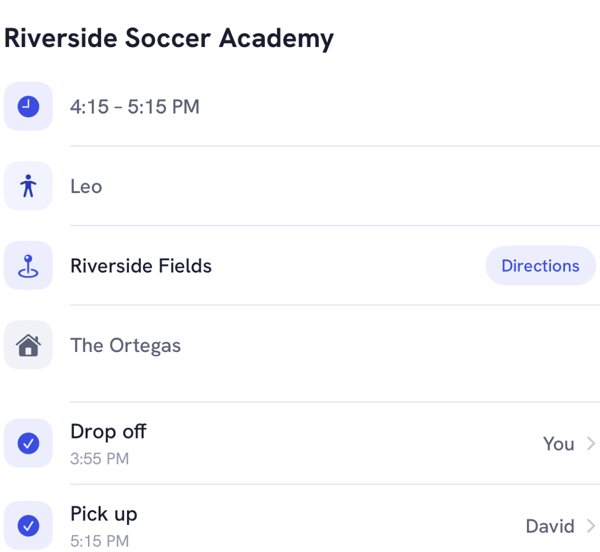
Driving is where phones pull clearly ahead. Say your son's chess club ends at 6:45 on Thursdays and your partner has the pickup. In Kidbud (our app) you'd put your partner's name on that pickup, and the leave alert reaches them at their desk. A screen in the kitchen would be showing the same thing to the dog.
Which family command center setup should you choose?
Choose by where your week goes wrong. If the trouble is paper and chores, a wall is enough. If calendars live in three places and nobody checks them, a screen helps. If the trouble is who's driving and leaving on time, it has to be on your phones. Two working parents with school-age kids usually need a small paper station plus an app.
| Your family | What we'd set up | Rough cost |
|---|---|---|
| Little kids, one parent home most afternoons | Wall with chore chart, or a Skylight screen | A few dollars to $299.99 |
| Two working parents, school-age kids in classes | Small paper station for forms, plus a shared phone calendar or drop-off and pickup app | $0 to $59.99 a year |
| Big family, calendars already in Google or Outlook | A digital screen that syncs them, plus a forms tray | $299.99 to $699, plus any plan |
| Co-parents or grandparents helping out | A phone app everyone can be invited to | Varies by app |
That's our judgment, not a rule. If your family already uses a whiteboard happily, don't let anyone (us included) talk you into a screen.
What part of a family command center does Kidbud cover?
Kidbud covers the calendar and the drop-off and pickup part, and nothing else. It's a family calendar app for iPhone and Android: every child's classes in day, week and month views, a filter by child, and one parent assigned to each drop-off and pickup. That driver gets a traffic-aware Leave Now reminder, timed separately for drop-offs and pickups.
The gaps matter for a command center. Kidbud has no chores, no lists and no meal planning, and no wall display. It doesn't sync with Google or Apple calendars. So you'd still want a chore chart and a forms tray somewhere in the house. You can invite your spouse, a caregiver or grandparents, and it's $59.99 a year or $12.99 a month, with one subscription covering everyone you invite.
The "who's driving" part of your command center
Kidbud puts a name on every drop-off and pickup and tells that parent when to leave.


Frequently asked questions
What are some family command center ideas for a small space?
Use the inside of a pantry or closet door. A slim dry-erase week calendar, a single wall file for forms and a clip for the lunch menu fit on most doors. Move the chore chart to the fridge if the door gets crowded.
What do you put in a family command center?
The family calendar, a named driver for every drop-off and pickup, a tray for forms and permission slips, the school lunch menu and a chore chart. Add a meal plan or a key hook only if your family uses them every week.
What is a digital family command center?
It's a touchscreen, usually on a kitchen wall or counter, that shows a shared family calendar synced from Google, Outlook or Apple, plus chores and often meal planning. Skylight and Hearth are the best-known examples.
Is there a family command center app?
Yes. Shared calendars like Google's family calendar cover the basics on every phone. Kidbud is a family calendar app that assigns each drop-off and pickup to one parent and sends that driver a Leave Now reminder. It doesn't do chores or lists, so pair it with a wall chart.
Sources
- Pew Research Center, facts about U.S. mothers, May 2023 (fall 2022 survey)
- American Academy of Pediatrics, HealthyChildren.org, chores and responsibility
- Skylight, Calendar 2 product page and Calendar Plus pricing (checked October 2026)
- Hearth, Hearth Display product page and membership plans (checked October 2026)
- Google Families Help, use a family calendar on Google