
Short answer
For most families, the Skylight Calendar 2 is the better buy: $299.99 for a 15-inch screen, and its $79 a year Plus plan is optional. Hearth is a 27-inch wall screen at $699 with a required membership from $86.40 a year, so it costs roughly twice as much over three years. Buy either one only if your family really plans from the kitchen.
What is the difference between Hearth and Skylight?
Size and subscription. The Hearth Display is one product, a 27-inch touchscreen that only mounts on a wall, and its membership is required to set it up. Skylight sells a 15-inch Calendar 2 that stands on a counter or hangs on a wall, plus a 27-inch Calendar Max, and its Calendar Plus plan is optional. Both sync your existing calendars and both do chores.
Under the hood they're closer than the price gap suggests. Both pull in Google, Outlook, Apple and Cozi calendars (Skylight adds Yahoo and any calendar with a public link). Both have a phone app, routines or a task list for kids, and meal planning.
Where they split is what you pay for. Hearth bundles everything into the membership: its AI scheduling assistant, Hearth Helper, plus meal planning, lists, routines with rewards and habit streaks. Skylight gives you its Tasks Manager, custom lists and color coding with the screen, and keeps rewards, meal planning, the photo screensaver, Magic Import and Disney Mode behind Plus.
Neither one knows which parent is driving to swim on Thursday, by the way. They show the event and stop there. (That gap is the reason we built Kidbud as a phone app and not as one more screen, so weigh our opinions here with that in mind.)
How much do Hearth and Skylight cost over three years?
Over three years, a Skylight Calendar 2 with Calendar Plus comes to $536.99, or $299.99 if you skip Plus. A Skylight Calendar Max with Plus is $836.99. A Hearth Display is $958.20 on the annual membership, or $906.36 if you prepay its three-year plan. These are list prices, checked October 2026, before any sale codes.
| Option | Upfront | Subscription | Three-year total |
|---|---|---|---|
| Skylight Calendar 2 (15") | $299.99 | Calendar Plus $79 a year, optional | $536.99 with Plus, $299.99 without |
| Skylight Calendar Max (27") | $599.99 | Calendar Plus $79 a year, optional | $836.99 with Plus, $599.99 without |
| Hearth Display (27") | $699 | Required: $9 a month, $86.40 a year, or $207.36 for three years | $958.20 paying yearly, $906.36 on the three-year plan |
| Kidbud (phone app, no screen) | $0 | $59.99 a year, or $12.99 a month | $179.97 paying yearly |
Prices checked October 2026. Hearth was running a 10% off code when we looked, which knocked the display to $629.10, and both companies include the first month of their plan. Sales come and go, so check Hearth's product page and Skylight's product page before you buy.
Look hardest at the subscription column. You can own a Skylight and never pay Skylight another cent. A Hearth without the membership is mostly a large dark rectangle, since Hearth says the membership is required to set the display up.
What we can't tell you is how long families keep using these screens after the first few months. We haven't found any independent data on it, and the companies don't publish it. That matters, because the three-year totals assume you're still paying in year three.
Hearth display vs Skylight calendar: how do they compare feature by feature?
Feature for feature, they're nearly a tie, as the section above suggests. Hearth wins on screen size and on bundling routines and rewards into the one membership. Skylight wins on price, on having a size that stands on a counter, and on working with no subscription at all. Neither one assigns a driver to a drop-off or pickup, which is the column we'd look at if school runs are your real problem.
| Feature | Skylight Calendar 2 | Hearth Display | Kidbud |
|---|---|---|---|
| Screen | 15 inches, counter stand or wall | 27 inches, wall only | None. It lives on each parent's phone |
| Subscription | Optional, $79 a year | Required, from $86.40 a year | Required, $59.99 a year or $12.99 a month |
| Pulls in Google, Outlook, Apple calendars | Yes, plus Cozi and Yahoo | Yes, plus Cozi | No, it doesn't sync or import them |
| Chores and routines | Tasks Manager included, rewards need Plus | Routines, rewards and streaks with membership | No |
| Meal planning | With Plus | With membership | No |
| A named driver on each drop-off and pickup | No | No | Yes |
| Traffic-aware alert telling the driver when to leave | No | No | Yes |
One more practical difference. A 27-inch screen is about the size of a large computer monitor, and Hearth's measures 16.5 by 26.7 inches. Look at your wall before you look at the feature list. Plenty of kitchens don't have that much empty wall near an outlet.
Is the Skylight Calendar Max a better deal than Hearth?
If you want a 27-inch screen, the Skylight Calendar Max is cheaper. It lists at $599.99 against Hearth's $699, and its subscription is optional, so three years with Plus comes to $836.99 versus $958.20 for Hearth on yearly billing. Hearth's case is that its routines, rewards and AI helper all come in the one membership.
The Max hangs on the wall only, sideways or upright. So does Hearth. If you were hoping for a big screen on the counter, neither of them does that.
Our take: the Max is the better value for a big screen. We'd only pick Hearth if you've tried its routine and rewards features and know your kids will actually use them, because that's where it pulls ahead and you'll pay for it every year.
Is a digital family calendar worth it?
A digital family calendar screen is worth it when someone is home most afternoons and the kids are still young enough to love a chore chart. It's much less useful when both parents work away from home, because the screen stays in the kitchen while the schedule actually happens in the car, at the office and in the school parking lot.
We'd skip the screen unless your kids are under about six or you know you'll use the chore chart. That's a judgment call, not data. Think about where your week actually breaks. It's 4:40, art ends at 5:00, and you're at your desk across town. A beautiful screen at home shows the right event to an empty room.
Who should buy one:
- Families with preschoolers or early readers who like ticking off a morning routine.
- A parent who's home most afternoons and plans from the kitchen.
- Households that will really use a weekly meal plan on the wall (be honest).
- Families already happy with a Google, Outlook or Cozi calendar who just want it visible to the kids.
Who probably shouldn't: two working parents with school-age kids whose real headache is who's driving and when to leave. A shared calendar on your phones costs nothing extra, and an app like Kidbud puts a driver's name on each drop-off and pickup. Our Skylight Calendar alternatives guide covers the no-screen options in more detail.
Where does Kidbud fit if you're choosing between Hearth and Skylight?
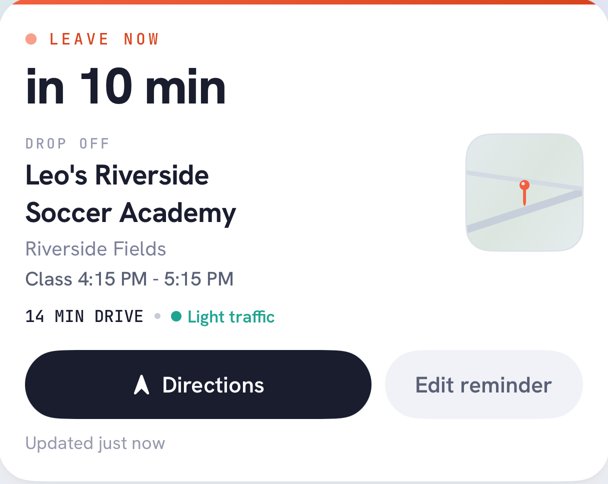
Kidbud, the app we make, is a family calendar for iPhone and Android built around drop-offs and pickups, with no screen at all. Every class gets a drop-off and a pickup, each assigned to one parent, and that parent gets a traffic-aware Leave Now reminder. It has no wall display, no chores and no meal planning, and it doesn't sync with Google or Apple calendars.
You can invite your spouse, a sitter or the grandparents, and filter the day, week or month view by child. It's $59.99 a year or $12.99 a month, and one subscription covers everyone you invite.
It does a different job from either screen. A family could reasonably run a Skylight in the kitchen for the chore chart and Kidbud on their phones for the driving, though that's two subscriptions if you add Plus. If you're weighing apps instead of screens, our best family calendar app roundup compares the main options.
The screen stays home. The driver doesn't.
Kidbud puts a name on every drop-off and pickup and tells that parent when to leave.


Frequently asked questions
How much does a Hearth Display cost?
The Hearth Display lists at $699, and Hearth says its membership is required to set it up. The membership is $9 a month, $86.40 a year, $155.52 for two years or $207.36 for three. Over three years on annual billing, that adds up to $958.20.
What is the Skylight Calendar Max?
It's Skylight's 27-inch calendar, listed at $599.99. It mounts on the wall only, sideways or upright, and works with the same optional $79 a year Calendar Plus plan as the 15-inch Calendar 2.
Is a digital family calendar worth it?
It's worth it if your family plans from the kitchen and your kids are young enough for chore charts. If most of your scheduling problems happen in the car or at work, a shared phone calendar or a drop-off and pickup app will help more.
What is the best digital wall calendar for families?
For most families, the 15-inch Skylight Calendar 2 at $299.99, because it's the cheapest and works without a subscription. If you want a 27-inch screen with routines and rewards included in one plan, Hearth is the stronger pick, at a higher price.