
Short answer
Make one weekly grid with a row for each day and a column for each child. Write every class with its start and end time, then add two more columns: who does the drop-off and who does the pickup. Fill it in on Sunday night, post it where everyone sees it, and change it the moment a time moves. The template below does exactly that.
Why do kids' activity schedules fall apart?
They fall apart because the schedule lives in one person's head, and the plan for each class stops at the start time. It rarely says who's driving or when they need to leave. Add two or three kids and different venues, and Tuesday at 4:15 becomes a chain of texts. A written weekly schedule with a driver on every leg fixes most of that.
This is an ordinary problem. In Census Bureau data from 2014, 42% of school-age children played sports, 30% took lessons and 28% were in clubs. (That's the most recent breakdown we could find, and it's more than a decade old, so treat it as a floor.) And somebody has to keep track: in a 2022 Pew Research Center survey, 78% of mothers living with a spouse or partner said they do more than their partner to manage the kids' schedules and activities.
Picture a Thursday. Piano ends at 5:00 across town, soccer starts at 5:15 in the other direction, and the cleats are in the other car. Nobody planned it badly. It just never made it onto one page. (That page, plus a nudge to the right driver, is roughly what we set out to build with Kidbud.)
How do you organize kids' activities into one weekly schedule?
Collect every activity first, then lay them out by day, then assign drivers. Gather class times from emails, team apps and the fridge. Put each one in the right day and child. Mark clashes where two kids need to be in different places at once. Finally, write a name next to each drop-off and pickup, so nobody assumes the other parent has it.
- List every recurring activity for each child, with the venue and the exact start and end time.
- Add one-off events for the coming week: games, recitals, a birthday party on Saturday.
- Put everything into the weekly grid, one column per child.
- Circle any afternoon where two activities overlap or sit less than 30 minutes apart in different places.
- Assign a drop-off driver and a pickup driver to every activity. One name each.
- Work out when each driver has to leave, not just when class starts. Our guide to what time to leave for drop-off and pickup walks through it.
- Post it by the door and go over next week together on Sunday.
If you only do one step properly, make it step five. It's the step that stops two parents turning up at the same gym while a third kid waits outside another one. If the driving split itself is the sticking point, see how to split drop-offs and pickups.
Free printable kids' activity schedule template
This template is a weekly activity schedule for kids, with a row for each day, a column for each child's activity and time, and two columns for the drop-off driver and the pickup driver. Print this page, or copy the table into a spreadsheet or document and rename the child columns. A filled-in example follows, so you can see how a real week looks.
| Day | Child 1: activity and time | Child 2: activity and time | Child 3: activity and time | Drop-off driver | Pickup driver |
|---|---|---|---|---|---|
| Monday | |||||
| Tuesday | |||||
| Wednesday | |||||
| Thursday | |||||
| Friday | |||||
| Saturday | |||||
| Sunday |
If two kids have activities on the same afternoon with different drivers, split the driver cells, for example "Maya: Sarah, Leo: David". Here's a made-up week for two kids, so you can see it filled in.
| Day | Maya (9) | Leo (6) | Drop-off driver | Pickup driver |
|---|---|---|---|---|
| Monday | Swim, 4:00 to 4:45 | None | Sarah | Sarah |
| Tuesday | Soccer, 5:15 to 6:15 | Art, 4:30 to 5:30 | Maya: David, Leo: Sarah | Maya: David, Leo: Sarah |
| Wednesday | Free afternoon | Free afternoon | None | None |
| Thursday | Piano, 4:15 to 5:00 | Soccer, 5:15 to 6:00 | Sarah (both) | David (both) |
| Friday | None | Swim, 4:00 to 4:30 | Grandma | Grandma |
| Saturday | Soccer game, 9:00 | Birthday party, 11:00 to 1:00 | Maya: David, Leo: Sarah | Maya: David, Leo: Sarah |
| Sunday | None | None | None | None |
Sarah, David and their kids are invented. The Tuesday probably isn't.
What should you write in each box of a family schedule template?
Write the activity, the start and end time, and the venue if it changes. In the driver columns, write one name, never "us" or "whoever". If gear has to travel, add it in a few words, like "cleats, shin guards". Keep each box short enough to read from across the kitchen, because if it's slower to read than texting your partner, people will just text.
- Use the end time for pickups. "Swim 4:00" tells the pickup driver nothing useful.
- Give each child a color if you print in color. Gray pencil works fine too.
- Mark free afternoons on purpose, so nobody fills them by accident.
- Note the backup driver once at the top of the page, a grandparent or neighbor who can cover.
Use pencil. Something will move by Wednesday.
How much should you put on a kids' weekly schedule?
Less than you think. Mississippi State University Extension suggests putting a limit on how many activities each child does per season or semester, and reminds parents that not all of a child's time needs to be scheduled. Free time is when kids play and rest. A schedule with one empty afternoon a week is easier to keep, too.
The same extension guide recommends using a visual calendar to help kids understand their routine, and reviewing the schedule regularly so it stays manageable. We'd add a blunt rule of our own: if the grid has more than one circled clash per week, something should go. Our guide to how many extracurricular activities is a good place to decide what.
Should you use a printable schedule or a kids schedule app?
Use a printable schedule if your week is simple and someone is home to read it. Use an app if both parents work away from home, if grandparents or a sitter help with driving, or if times change often. Paper costs nothing and the kids can read it. An app updates on every phone at once and can remind the driver, which paper can't.
A shared Google calendar is a solid no-cost option. When you set up a family group on Google, a calendar called "Family" is created automatically, and everyone in the family can change its events. It doesn't name a driver for each leg, though, so you'd type it into the event title.
For what it's worth, the template above is close to how we laid out Kidbud's week view. You'd tap Tuesday's soccer, set the drop-off and pickup to David, and David gets the leave alert instead of whoever happens to be looking.
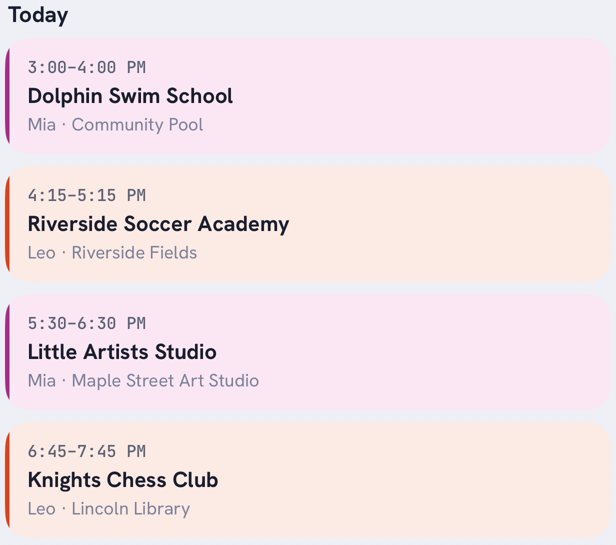
How does Kidbud help with a kids' activity schedule?
Kidbud is our family calendar app for iPhone and Android, and it's basically this template on everyone's phone. Every child's classes go into day, week and month views that you can filter by child. Each drop-off and pickup is assigned to one parent, and that driver gets a traffic-aware Leave Now reminder, timed separately for drop-offs and pickups.
You can invite a spouse, a caregiver or the grandparents, so Friday's driver sees Friday. Discover can suggest local classes matched to each child's interests and add one straight to the calendar. The limits are real: there's no printable view, no chores or lists, and it doesn't sync with Google or Apple calendars. It's a subscription, $59.99 a year or $12.99 a month, and one subscription covers everyone you invite.
A schedule that tells the driver when to leave
Kidbud puts every class and every drop-off and pickup driver in one shared family calendar.


Frequently asked questions
How do you make a weekly activity schedule for kids?
Make a grid with a row for each day and a column for each child. Write each activity with its start and end time, then add a drop-off driver and a pickup driver for every one. Review it together on Sunday night.
What should a family schedule template include?
Each day of the week, every child's activities with start and end times, the venue if it varies, and one named driver for each drop-off and pickup. A line at the top for a backup driver helps too.
What is the best kids schedule app?
For just seeing everything in one place, a shared Google calendar does the job at no cost. If the hard part is who's driving, Kidbud assigns each drop-off and pickup to one parent and sends that driver a Leave Now reminder.
How do you organize kids' activities with more than one child?
Put every child on one weekly grid instead of separate lists, so clashes show up. Circle afternoons with overlapping activities, assign a different driver to each child on those days, and cut an activity if clashes happen every week.