
Short answer
If you both have iPhones, share an iCloud calendar from the Calendar app (Calendars, then the info button, then Add Person) and turn on Allow Editing. If either of you uses Android, share a Google calendar instead, because it works fully on both phones. Then agree on one rule: every event that needs a parent gets that parent's name on it.
It's Wednesday, 3:40. Swim ends at 4:00, the event is sitting right there on both your phones, and you're each assuming the other one has it. A shared calendar would have shown you both the class. It wouldn't have shown you who was going.
So yes, set up the shared calendar. The steps for both phones come straight from Apple's and Google's help pages. But the 3:40 problem needs a separate fix, and we'll get to it.
What is the best way to share a calendar with your spouse?
Let your phones decide. Two iPhones: a shared iCloud calendar is built in and takes about two minutes. One iPhone and one Android, or two Androids: use Google Calendar, which runs fully on both. Apple Family Sharing and Google's family group each add a ready-made family calendar, which is handy if you already pay for or use them for other things.
| Option | Works on | Good at | Falls short on |
|---|---|---|---|
| Shared iCloud calendar | iPhone, iPad, Mac | Built into the Calendar app, editing can be on or off per person | Your spouse needs to be an iCloud user to edit |
| Apple Family Sharing | Apple devices | Covers you and up to five family members, and Apple says it sets up a shared family calendar for you | No help for an Android spouse |
| Shared Google calendar | Android, iPhone, any browser | Five permission levels, works across platforms | New calendars can only be created in a browser |
| Google family group | Android, iPhone, any browser | Creates a calendar called Family automatically, and everyone in it can edit | No alert by default when your spouse adds or edits an event |
| Kidbud | iPhone and Android | Kids' classes, with each drop-off and pickup assigned to one parent | Built for kids' activities only, and it doesn't import from Apple or Google calendars |
(We make Kidbud, so weigh that last row accordingly. If your shared calendar is mostly dinners and dentist appointments, one of the first four is the right tool.)
How do I share a calendar with my spouse on iPhone?
Use a shared iCloud calendar. In the Calendar app, tap Calendars, tap the info button next to the iCloud calendar you want to share, tap Add Person, and enter your spouse's name or email address. They get an invitation to join. Afterwards you can turn Allow Editing on or off for them at any time.
One tip before the steps: make a new calendar just for the family instead of sharing your personal one. Your 1:1s with your manager don't need to be on your spouse's phone.
- Open the Calendar app and tap Calendars.
- Tap Add Calendar, name it (we like the plain "Family" or your surname), and make sure it's an iCloud calendar.
- Tap the info button next to the new calendar, then tap Add Person.
- Enter your spouse's name or email address. Apple notes that the contact needs an email address for this to work.
- Tap Add. Your spouse accepts the invitation on their phone.
- To change their access later, tap the info button, tap their name, and turn Allow Editing on or off.
If you already use Family Sharing (it covers you and up to five family members), Apple says a calendar shared with everyone in the family is created automatically. Set up Family Sharing from Settings: tap your name, tap Family, then Continue.
One more setting. Apple lets you turn off notifications when someone changes a shared calendar (Settings, Notifications, Calendar). We'd leave them on for the first few weeks.
How do I share a Google Calendar with my spouse?
On a computer, open Google Calendar, find the calendar under My calendars, choose Settings and sharing, then Add people and groups. Enter your spouse's email, pick a permission level, and click Send. On Android you can do the same from the Calendar app's settings. Your spouse has to click the link in Google's email before the calendar appears.
- Create a calendar just for the family. Google only lets you create new calendars in a browser, so do this step on a computer.
- Under My calendars, click More next to it, then Settings and sharing.
- Under Shared with, click Add people and groups and enter your spouse's email address.
- Choose a permission. For a spouse, pick "Make changes and manage sharing", so they can add grandparents later without asking you.
- Click Send. On an Android phone it's Menu, Settings, pick the calendar, Add people or groups, then Save.
The other route is a Google family group. Go to g.co/yourfamily, select Create a family group, and invite people (up to six in the group, including you). Google then creates a calendar called Family automatically, and every member can change its events. Two catches from Google's help pages: you can only be in one family group at a time, and you can only switch groups once every 12 months. Our full walkthrough is in how to set up a shared family calendar in Google Calendar.
What if one of you has an iPhone and the other has Android?
Use Google Calendar. It has a full app for both iPhone and Android, so you each get the same calendar with the same editing rights. Apple's shared iCloud calendars are meant for other iCloud users, and the only way to share outside that is a public, read-only link, which means your spouse could see events but never add one.
That read-only gap matters more than it sounds. The parent who can't edit becomes an audience, and the other one ends up typing in every class.
Our honest take: even two-iPhone couples might pick Google if there's any chance one of you switches phones. Moving a family's worth of recurring classes later is a chore nobody volunteers for.
Does a shared calendar tell you who's driving?
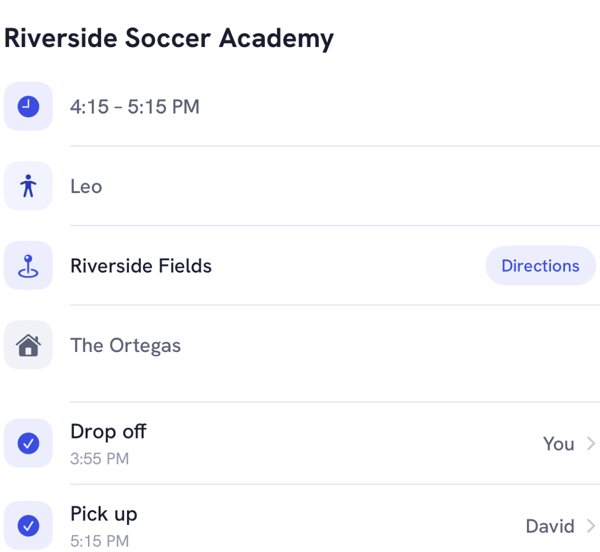
No. A shared calendar shows both of you that soccer is at 4:15. It doesn't say which of you is doing the drop-off or who's on the pickup at 5:15, and neither Apple nor Google has a field for it. You can fake one with a naming habit, but nothing reminds the right person when it's time to go.
This is the bit that tends to land on one parent. In a 2022 Pew Research Center survey, 78% of mothers with children under 18 who were married or living with a partner said they do more of the managing of their children's schedules and activities. Both of you can see the calendar now. Somebody still has to look at it at 3:30 and notice that nobody's name is on swim.
If you stay with Google or Apple, a naming habit gets you most of the way:
- Start the title with the driver: "DAD drop-off, soccer" and "MOM pickup, soccer" as two separate events.
- Put the leave time in the event, not the class time. A 4:15 class 14 minutes away is a 3:55 event.
- Add a 10-minute alert on the driver's event only.
It's manual, and it breaks the week someone copies an event without renaming it. That frustration is why we built Kidbud the way we did: there, each drop-off and pickup is a separate leg with one parent's name on it, and only that parent gets the leave alert. Our guide on splitting drop-offs and pickups with your spouse covers how to decide who takes which.
How do you get both of you to actually use it?
Agree on two small rules and a weekly check. Rule one: if it needs a parent, it goes on the shared calendar, not in a text. Rule two: an event isn't done until it has a name on it. Then look at the coming week together for five minutes on Sunday evening and fix anything that clashes before Monday.
Whether the Sunday check survives past October is another matter. We don't know of good data on how long couples keep a habit like this. Our guess: it lasts longer when it's tied to something you already do, like the Sunday dinner dishes.
Two smaller things:
- Give each child a color. In Google Calendar the easy way is one calendar per child, since each calendar has its own color.
- Put the address in the location field. Future you, leaving from work, will be glad.
Our mental load checklist for couples goes further on who notices, who decides and who does each of these jobs.
How Kidbud fits in
Kidbud is a family calendar for kids' classes, on iPhone and Android, so a mixed couple shares one family. You invite your spouse (and grandparents or a sitter, if they help), add each child's classes, and assign every drop-off and pickup to one person. The assigned driver gets a traffic-aware Leave Now reminder, with timing you set separately for drop-offs and pickups.
What it isn't: a general calendar. It doesn't sync with or import from Google or Apple calendars, so you'd keep those for work and everything else. It's a subscription, $59.99 a year or $12.99 a month, and one subscription covers everyone you invite to the family.
Share the classes, and who's driving each one
Kidbud puts one parent's name on every drop-off and pickup, on iPhone and Android.


Frequently asked questions
How do I share a calendar with my spouse on iPhone?
Open the Calendar app, tap Calendars, tap the info button next to an iCloud calendar, then tap Add Person and enter your spouse's name or email address. Turn on Allow Editing if you both want to add and change events.
Can I share a Google Calendar with a spouse who has an iPhone?
Yes. Share the calendar to their Google account, and they accept from the email Google sends. They can then use it in the Google Calendar app on their iPhone.
Should we use Apple Calendar or Google Calendar as a couple?
If you both use iPhones and never plan to switch, a shared iCloud calendar is the simplest choice. If either of you uses Android, or might, use Google Calendar, because it works fully on both.
What is the best shared calendar for an iPhone and Android couple?
For general events, a shared Google calendar. For kids' classes where you also need to know which parent does each drop-off and pickup, an app that runs on both platforms and assigns a driver, such as Kidbud, covers the part a plain calendar leaves out.
Sources
- Apple, Share iCloud calendars on iPhone
- Apple, How to set up Family Sharing on your iPhone or iPad
- Apple, Share iCloud calendars (iOS 10 guide, on the Family Sharing calendar)
- Google Calendar Help, Share your calendar
- Google Calendar Help, Create a new calendar
- Google for Families Help, Create a family on Google
- Google for Families Help, Use a family calendar on Google
- Pew Research Center, Facts about U.S. mothers, May 2023 (survey from fall 2022)